

Running multiple restaurant locations means connecting data across multiple systems. Too often, that connection only happens after month-end is closed by the finance team, resulting in lagging feedback to the operator that arrives too late to take action.
ForteSG’s Winter 2026 release is designed to close that gap. The release gives multi-location restaurant operators clearer, in-week visibility into how schedules, labor, and financials are performing, so teams can spot issues earlier and adjust before margins are impacted.
Building on the operational tools ForteSG introduced last year, the Winter 2026 release adds new accounting focused capabilities delivering real-time feedback of financial performance.
“Operators don’t struggle because they lack data,” said Bob Looney, CEO of ForteSG. “They struggle when systems don’t integrate and cleanly consolidate information into consumable reports and visuals. This release tightens that connection, bringing more of the restaurant tech stack together and giving teams clearer access to actionable data.”
Keep Financials Visible Throughout the Month
Winter 2026 introduces accounting specific tools that help teams stay organized without slowing down month-end close.
Monthly Operations Statement, Daily Visibility
By combining Forte’s ability to map sales transactions and labor costs to GL Accounts with purchasing and inventory data from connected systems, operators can monitor and compare overall financial performance throughout the period.
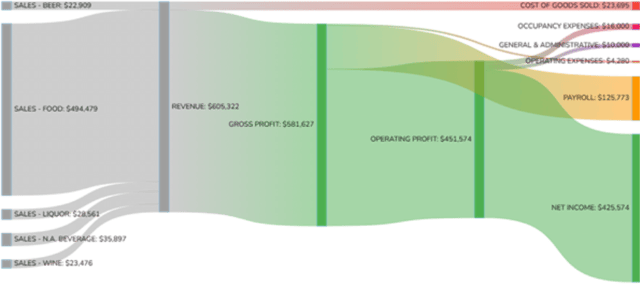
For operators and team members less accustomed to financial reporting, Forte also includes a Cash Flows visualization driven by the Ops Statement to illustrate the financial impact of revenue and expenses.
Reports and Tools for Restaurant Finance Teams
This release includes the ability to add Journals directly to Forte as well as import purchase summaries and inventory summaries from connected COGS and AP systems. GL Account based Budgets are supported with budget-vs-actual reporting available in multiple views and visuals.
Understand How Labor and Sales Show Up in Your Financials
Day-to-day operational decisions only matter if they translate into financial results. Winter 2026 improves visibility into how labor, sales, and menu performance affect the bottom line.
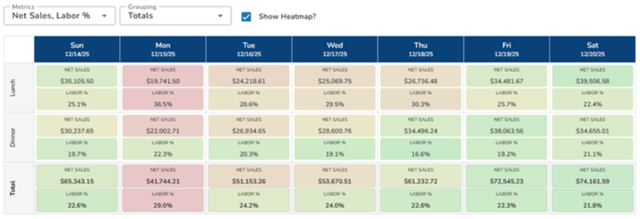
Compare Daypart Performance throughout the Week
Uncovering relative performance and staffing throughout the week is now easy with the new Weekly Insights report. Slice and dice by revenue centers, order modes, or a combination of both and apply heatmap coloring by metric to highlight key focus areas.
See Which Employees, Items, and Checks Are Driving Results
Expanded reporting makes it easier to understand performance at a more detailed level. Operators can review employee performance with an improved Employee Insights report, see how menu items contribute to margins with Product Mix reports, and drill down to analyze sales activity at the check and payment level.
This clarity supports better staffing decisions, smarter menu adjustments, and more informed operational conversations.
Account for Comps, Fees, and Other Costs in One Place
Additional financial details such as comp reasons and notes, loyalty activity, payment processing fees, and gift card usage are now included in POS integrations and sales reporting. This provides a more complete picture of revenue and costs without relying on multiple systems or manual reconciliation.
Why Operators Use Forte
With expanded reporting, refined scheduling, and a purpose-built platform for multi-unit complexity, Forte gives operators the visibility and control the need to protect margins and act with confidence. By connecting sales, labor, and financial data in one clear view, Forte helps operators simplify the complex and turn insights into action.
Ready to See What’s New?
See how Forte’s newest release can streamline reporting and scheduling across your locations. Request a personalized demo today.
.jpg)
.jpg)
SHARE